How to build a creator media kit brands actually read
Brands decide in seconds whether to keep reading. Lead with the numbers their own creator-search tools filter on, show where each figure came from, and keep it to one page.

A media kit is a creator's one-page pitch: who you are, who watches you, what it costs to work with you, and proof that it has worked before. Most kits fail for the same reason. They lead with follower counts and pretty photos, while the person reading them is trying to answer a narrow question: will this creator put our product in front of the right people at a sensible price? This guide shows how to build a kit around that question, using the same numbers brands already filter on inside the platforms' own creator marketplaces.
Start with what brands search for
The clearest signal of what brands care about is how the platforms let them search for creators. In TikTok One, TikTok's marketplace connecting creators and advertisers, brands can filter creators by audience country or region, audience age range, gender ratio, median video views and engagement rate. YouTube's equivalent, now called Creator Partnerships (formerly BrandConnect), exists so that brands can discover creators for brand deals; it requires creators to be 18 or over, in the YouTube Partner Program and free of active Community Guidelines strikes.
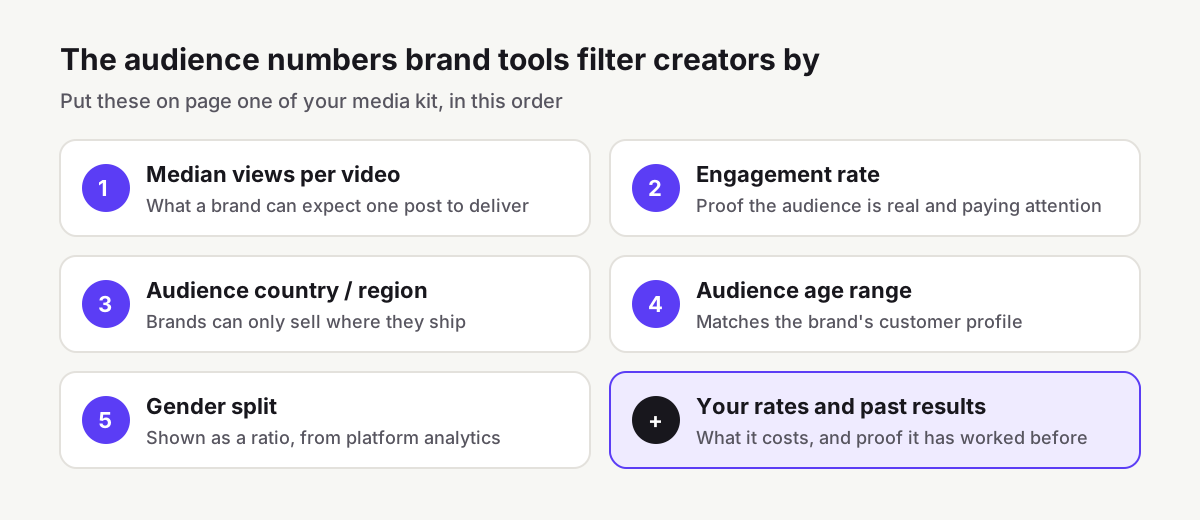
Those filters are effectively a brand's checklist. If your kit answers them on the first page, you have already passed the first screen.
The one-page structure
- Header: name, handle(s), one line on what your content is about and who it's for. "Budgeting and investing explainers for people in their twenties" beats "lifestyle creator".
- Reach and performance: median or average views per post for each platform, and your engagement rate. Use a recent window, such as the last 30 or 90 days, and say which.
- Audience: top countries, age ranges and gender split, taken from your platform analytics.
- Rates: a price for each core deliverable and one or two packages. Our sponsored post rate calculator gives a view-based starting range.
- Proof: two or three past partnerships with a result each (views, clicks, a code redemption count), or, if you haven't done paid work yet, your best-performing organic posts in the brand's category.
- Contact: a business email and how quickly you reply.
Keep it to one page or one screen. A two-page PDF is fine for a detailed rate card, but page one has to stand on its own.
Instagram now counts views, so update your numbers
If your kit still shows "impressions" for Instagram, it is out of date. In 2024 Instagram moved to views as its primary metric across Reels, Stories, photos and carousels. Meta's developer documentation now lists impressions as deprecated for media created after 2 July 2024, and defines the two figures you should use:
- Views: the total number of times a post has been played or displayed, including repeat views by the same person.
- Reach: the number of unique accounts that saw the post at least once.
Views are always the larger number, because one person can watch twice. Brands increasingly price on views, so show views per post, but include reach as well if a brand asks how many distinct people you reach. Don't present a views figure as "people reached". Meta also notes that some insights aren't available on accounts with fewer than 100 followers.
Where to get each number
| Figure | YouTube | |
|---|---|---|
| Views per video | YouTube Studio → Analytics → Content | Insights on each post or Reel |
| Engagement | Likes, comments, shares per video; average view duration on the Engagement tab | Interactions on each post |
| Top countries | Analytics → Audience → Top geographies | Insights → audience section |
| Age and gender | Analytics → Audience → Age and gender | Insights → audience section |
| Export | Advanced Mode lets you export data | Screenshot the in-app audience view |
Two YouTube details are worth knowing. The audience report measures which age groups and geographies contribute most to your watch time, not your subscriber list, and YouTube warns that gender and geography data may be limited for some channels. For TikTok, use the Analytics section in TikTok Studio; check the date range and whether figures are estimates before you quote them.
Calculate your engagement rate the same way brands do: average interactions per post divided by followers. Our engagement rate calculator also tells you how that compares with accounts of your size on each platform.
Why honest numbers are now a legal issue too
Brands have good reason to be sceptical. In Influencer Marketing Hub's 2026 benchmark survey of more than 600 respondents, fake or bot followers accounted for 56.5% of all reported fraud and quality issues. Brands check: they compare your claimed views with your public posts, and they look for engagement that doesn't match follower count.
In the United States it is also a regulatory matter. The FTC's rule on consumer reviews and testimonials, in force since 21 October 2024, prohibits selling or buying fake indicators of social media influence, such as followers or views generated by bots or hijacked accounts, where the buyer knew or should have known they were fake. The practical rule for your media kit is simple: only include numbers you could back up with a screenshot from your own analytics, and say what period they cover.
Common media kit mistakes
- Leading with followers. Brands buy attention. Lead with views and engagement.
- Lifetime averages. Your best year doesn't help a campaign running next month. Use the last 30 to 90 days.
- No audience location. A brand that only ships to the UK can't use a mostly US audience, however large.
- "Rates on request." It adds a round of emails and signals you haven't priced your work. Give a starting price.
- Out-of-date files. Refresh the numbers monthly, and date the document so brands know they're current.
Quick checklist
- One-line description of your niche and audience
- Median or average views per post, per platform, with the date range
- Engagement rate, calculated by followers
- Top countries, age ranges and gender split from platform analytics
- Rates for core deliverables and at least one package
- Two or three results from past work, or best organic posts in the brand's category
- Business contact and the date the kit was last updated
Platform metrics and marketplace features change often. This guide reflects the sources below as reviewed on 29 October 2026.
References
- How to find creators who work with TikTok OneTikTok for Business Help Center
- About TikTok One for creatorsTikTok for Business Help Center
- Get started with YouTube Creator PartnershipsYouTube Help
- Introducing Views to simplify content distribution metricsMeta for Creators, 14 November 2024
- Instagram Media Insights (metric definitions)Meta for Developers
- Instagram Platform insightsMeta for Developers
- Views, views, views: Instagram standardizes its metricsTubefilter, 7 August 2024
- Understand your YouTube audienceYouTube Help
- Check your YouTube thumbnail impressions and watch timeYouTube Help
- Get started with YouTube AnalyticsYouTube Help
- Influencer Marketing Benchmark Report 2026Influencer Marketing Hub, 4 May 2026
- FTC announces final rule banning fake reviews and testimonialsUS Federal Trade Commission, 14 August 2024
- The Consumer Reviews and Testimonials Rule: Questions and AnswersUS Federal Trade Commission
We link to primary sources where possible. Rules and figures change; check the source for the current version.