YouTube Partner Program explained: requirements, revenue shares and what changes in 2027
Two eligibility tiers, three revenue shares and one big rule change on the way. Here is how YouTube actually pays creators, with a link to the official source for every number.

The YouTube Partner Program (YPP) is the gate between uploading videos and getting paid for them. Most of what circulates about it online is a few years out of date: the thresholds were split into two tiers in 2023, Shorts revenue works completely differently from long-form, and YouTube has announced new rules for 1 February 2027. This guide covers the program as it stands today, with every figure linked to YouTube's own help pages in the references below.
The two ways into the program
YPP now has two entry levels, and they unlock different things.
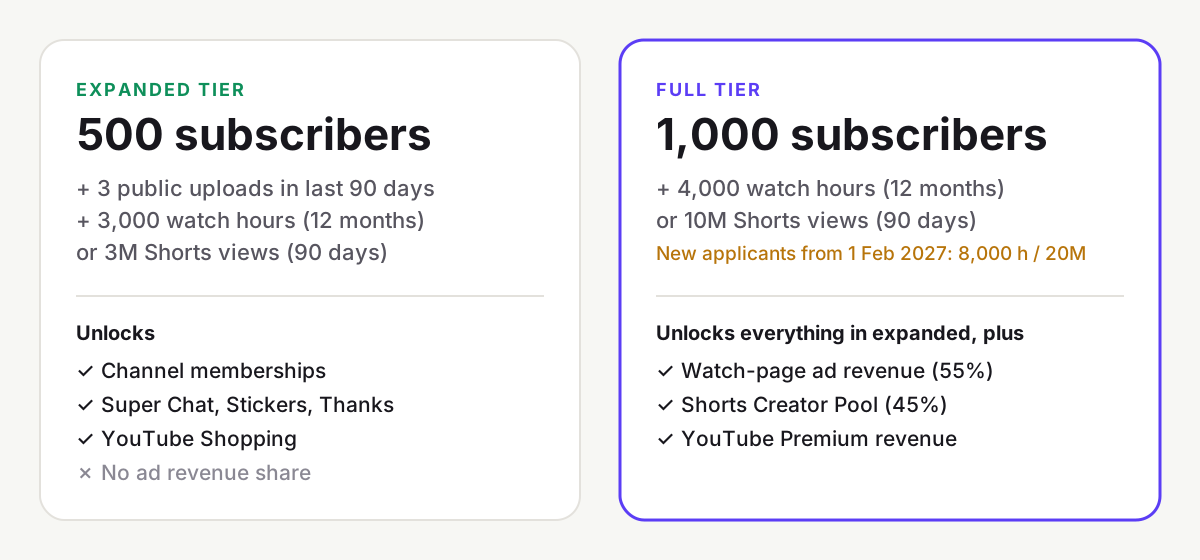
Expanded tier: fan funding and Shopping
You need 500 subscribers, 3 valid public uploads in the last 90 days, and either 3,000 watch hours in the last 12 months or 3 million Shorts views in the last 90 days. This tier unlocks channel memberships, Super Chat, Super Stickers, Super Thanks and YouTube Shopping. It does not include a share of ad revenue. It is only offered in a list of countries that includes the US, UK, Canada, India, Brazil, Germany, Japan and Australia; creators elsewhere go straight to the full tier.
Full tier: ad revenue
Ad and YouTube Premium revenue sharing needs 1,000 subscribers plus either 4,000 qualified watch hours in the last 12 months or 10 million qualified Shorts views in the last 90 days. Watch time from the Shorts feed does not count toward the 4,000 hours, so a channel that only posts Shorts must use the Shorts-views route. You also need to live in a country where YPP is available, follow YouTube's monetization policies and link an AdSense account.
Coming on 1 February 2027: new creators applying for ad revenue will need 1,000 subscribers plus 8,000 qualified watch hours in the last 365 days or 20 million qualified Shorts views in the last 90 days. Channels already in the program are not affected. Separately, to keep earning from the Shorts Creator Pool, a channel will need to maintain 10 million qualified Shorts views over the last 90 days; falling short stops Shorts pool earnings but does not remove the channel from YPP. The expanded tier's thresholds are not changing.
YouTube can also turn monetization off for channels that have had no uploads or community activity for six months or more, so the program rewards consistency as well as size.
How much YouTube pays: the three revenue shares
YouTube publishes its revenue shares in its partner earnings overview. All three are percentages of net revenue, after sales taxes and VAT:
| Revenue source | Creator share | How it's calculated |
|---|---|---|
| Long-form watch-page ads | 55% | Ads shown on and around your own videos |
| Shorts feed ads | 45% | Of the revenue allocated to you from the Creator Pool |
| Memberships, Super Chat, Super Stickers, Super Thanks | 70% | Of net revenue from your fans' purchases |
For Super Chat and Super Stickers, YouTube adds that the 70% is calculated after local sales tax and, for purchases made on iPhone, Apple's App Store fees. YouTube Premium subscribers also generate revenue for creators based on how much they watch your content; YouTube does not publish a single percentage for long-form Premium revenue, so treat any figure you see quoted with caution.
How the Shorts Creator Pool works
Shorts ads play between videos in the feed rather than inside your video, so YouTube can't attach an ad to a single creator. Instead, each month:
- Ad revenue from the Shorts feed in each country is pooled.
- Music licensing is paid for first. A Short with no licensed music contributes all its revenue to the Creator Pool; one with one track contributes half, two tracks a third, and so on.
- The Creator Pool is divided among monetizing creators by their share of engaged Shorts views in that country.
- You keep 45% of your allocation. YouTube states that this rate applies whether or not you used music.
Because the pool is shared by view share, Shorts pay a small amount per view compared with long-form videos. Our ad revenue calculator shows the gap for your own numbers: at the same view count, long-form videos usually earn many times more.
Mid-roll ads and the 8-minute rule
Mid-roll ad breaks are available on monetized videos that are 8 minutes or longer. You can manage where the breaks fall in YouTube Studio. More ad slots means more revenue per view, but only if viewers actually reach them. A video stretched to 8 minutes with filler loses viewers before the mid-roll, which also hurts how widely YouTube recommends it.
RPM vs CPM: read the right number
YouTube Studio shows two figures that are easy to confuse. CPM is how much advertisers spend per 1,000 ad impressions, before YouTube's share. RPM is how much you earned per 1,000 video views, after YouTube's share, across all revenue sources and counting every view, including those that showed no ad. YouTube itself describes CPM as advertiser-focused and RPM as creator-focused. When you forecast income, use RPM.
Other ways to earn inside the program
- Channel memberships: monthly paid tiers with perks such as badges, emojis and members-only posts. You must be at least 18, and channels set as made for kids or classed as music channels aren't eligible.
- Super Chat and Super Stickers: fans pay to highlight messages during live streams and Premieres.
- Super Thanks: a one-off tip on a regular video. It isn't available on age-restricted, unlisted, private or made-for-kids videos, or where comments are off.
- YouTube Shopping affiliate program: tag products from participating brands and earn a commission on sales. It's available in a limited set of markets, commissions arrive via AdSense 60 to 120 days after purchase, and returns are deducted.
Why a video earns "limited ads"
Every monetized video is checked against YouTube's advertiser-friendly content guidelines, which cover topics including strong language, violence, adult content, harmful acts, drugs, firearms, controversial issues and sensitive events. Depending on context, a video can earn full ads, limited ads or none. In YouTube Studio, a yellow dollar icon means the video doesn't meet all of the guidelines, so many advertisers opt out and it earns less; a green icon means it is fully eligible. If you think a video was classified wrongly, you can request a human review.
What this means for your channel
- If you are close to 500 subscribers and post regularly, the expanded tier can start fan income well before ad revenue.
- If you are working toward ad revenue and are still some way off, plan around the 2027 thresholds, as they will apply to you if you join after 1 February 2027.
- Shorts are a strong growth tool but a weak income source; long-form videos of 8 minutes or more are where ad revenue concentrates.
- Ad revenue is rarely a creator's biggest income line. Compare it with what a single sponsorship pays using our sponsored post rate calculator.
Rules and thresholds vary by country and change over time. This guide reflects YouTube's help pages as reviewed on 29 October 2026.
References
- YouTube Partner Program overview & eligibilityYouTube Help
- Overview of the expanded YouTube Partner ProgramYouTube Help
- Changes to the YouTube Partner ProgramYouTube Help
- YouTube partner earnings overviewYouTube Help
- YouTube Shorts monetization policiesYouTube Help
- How to earn money on YouTubeYouTube Help
- Manage YouTube Super Chat & Super Stickers for Live ChatYouTube Help
- YouTube Shopping affiliate program overview & eligibilityYouTube Help
- Manage mid-roll ad breaks in long videosYouTube Help
- Understand ad revenue analyticsYouTube Help
- Advertiser-friendly content guidelinesYouTube Help
- Monetization icon guide for YouTube StudioYouTube Help
We link to primary sources where possible. Rules and figures change; check the source for the current version.