YouTube CPM vs RPM: what each number means and why RPM is always lower
CPM is the advertiser's number; RPM is yours. Understanding the steps between them is the fastest way to work out why a channel earns what it does, and what to fix when revenue drops.

Open the revenue section of YouTube Analytics and you'll see two rates per thousand: CPM and RPM. They are often confused, and because CPM is always the bigger number, many creators overestimate what their channel will earn. This guide explains both using YouTube's own definitions, walks through the steps from one to the other with a worked example, and shows how to use them to diagnose a drop in revenue.
The definitions, in YouTube's words
| Metric | What YouTube says it measures | Whose number |
|---|---|---|
| CPM | How much advertisers are spending to show ads; the cost per 1,000 ad impressions, before YouTube's revenue share | Advertiser |
| Playback-based CPM | What an advertiser pays for 1,000 video playbacks where an ad is displayed | Advertiser |
| RPM | How much money you've earned per 1,000 video views, from ads, memberships, Premium, Super Chat and Super Stickers | Creator |
| Estimated monetized playbacks | The number of times your video was watched with ads | Both |
| Ad impressions | The number of times individual ads were viewed on your videos | Both |
YouTube describes CPM as advertiser-focused and RPM as creator-focused. That's the key distinction: CPM tells you how valuable your audience is to advertisers; RPM tells you what you take home.
From CPM to RPM: a worked example
Here is how a single long-form video gets from one number to the other. The numbers are illustrative; your own split will differ.
- Views: 100,000. Every view counts towards RPM.
- Monetized playbacks: 60,000. Not every view shows an ad. Viewers may use ad blockers, there may be no advertiser for that slot, or the viewer may be a YouTube Premium member (Premium revenue is counted separately).
- Ad impressions: 84,000. One playback can show more than one ad: a pre-roll and a mid-roll, for example. Mid-rolls are only available on monetized videos of 8 minutes or longer.
- Advertiser spend: $1,008. At a CPM of $12, that's 84,000 ÷ 1,000 × $12. (The playback-based CPM here would be $16.80, because each monetized playback carried more than one ad.)
- Your share: $554. YouTube pays creators 55% of net revenue from ads on the watch page.
- RPM: $5.54. $554 ÷ 100,000 views × 1,000.
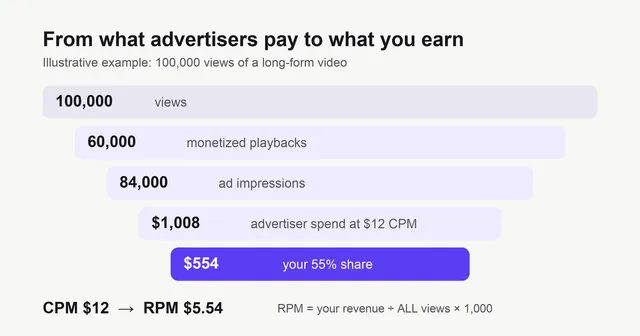
This is why YouTube itself names two reasons RPM is lower than CPM: RPM is after YouTube's share, and RPM includes views that weren't monetized. In this example, RPM is under half of CPM, which is common.
RPM includes more than ads
Unlike CPM, RPM adds every revenue source YouTube pays you: ads, channel memberships, YouTube Premium revenue, Super Chat and Super Stickers. Fan funding is paid at a different share (70% of net revenue for memberships and Supers), so a channel with an active community can have a noticeably higher RPM than its CPM alone would suggest. In YouTube Analytics, "estimated revenue" covers all revenue types, while "estimated ad revenue" covers only ads.
Shorts don't follow this funnel
Shorts ads play between videos in the feed, so there are no per-video ad impressions to multiply. Instead, Shorts revenue is pooled, music licensing is paid for first, and the Creator Pool is shared by each creator's share of engaged views; creators keep 45% of their allocation. Shorts views therefore have a very low RPM, and when Shorts make up more of your views, your channel-wide RPM falls even if long-form is doing well. Read more in Shorts vs long-form earnings.
Diagnosing a revenue drop
Because RPM sits at the end of a chain, a drop can start at any step. Work through them in order:
| What changed | Where to look | Likely cause |
|---|---|---|
| CPM fell | CPM in revenue analytics, by month | Seasonal advertiser demand (January is typically weak), audience shifting to lower-CPM countries |
| Monetized playbacks fell relative to views | Monetized playbacks vs views | More Shorts views, more videos with limited ads, more viewers in markets with fewer advertisers |
| Ad impressions per playback fell | Ad impressions vs monetized playbacks | Shorter videos, fewer mid-roll breaks, viewers leaving before mid-rolls |
| RPM fell but revenue held | Views vs revenue | More unmonetized views, which YouTube says lowers RPM without lowering revenue |
YouTube's revenue analytics page lists the main things that move CPM: the time of year, viewer location (different places have different levels of ad competition), the ad formats available, and whether a video is advertiser-friendly. Videos that don't meet the advertiser-friendly guidelines show a yellow icon in YouTube Studio and attract fewer advertisers; some earn nothing.
How to raise RPM
- Make long videos that hold attention past 8 minutes, so mid-roll breaks actually play.
- Keep content advertiser-friendly, especially titles, thumbnails and the opening seconds.
- Cover higher-value topics within your niche. See the highest-paying niches.
- Grow fan funding: memberships and Supers lift RPM directly at a 70% share.
- Plan around the season: publish your strongest evergreen videos before Q4. See why YouTube pays more in Q4.
To forecast income, use RPM, not CPM. Put your views into the ad revenue calculator, or multiply your expected views by your real RPM from YouTube Analytics and divide by 1,000.
Frequently asked questions
What is the difference between CPM and RPM on YouTube?
CPM is what advertisers spend per 1,000 ad impressions, before YouTube's share. RPM is what you earn per 1,000 video views, after YouTube's share, across all revenue sources and counting every view, including ones that showed no ad.
Why is my RPM so much lower than my CPM?
Two reasons, both named by YouTube: RPM is calculated after YouTube's revenue share, and it counts all views, including views where no ad played. A video with a $12 CPM can easily have an RPM around $5.
What are monetized playbacks?
YouTube defines estimated monetized playbacks as the number of times your video was watched with ads. Views without an ad, for example from viewers with ad blockers or no ad available, count as views but not as monetized playbacks.
Which number should I use to forecast income?
RPM. It reflects what you actually receive per 1,000 views from all sources. Multiply your expected views by your RPM and divide by 1,000.
My views went up but my RPM went down. Is something wrong?
Not necessarily. YouTube notes that RPM can fall when unmonetized views rise, even if revenue holds steady. Check whether the extra views came from Shorts, from lower-paying countries, or from videos with limited ads.
Definitions reflect YouTube's help pages as reviewed on 29 October 2026. The worked example uses illustrative numbers.
References
- Understand ad revenue analyticsYouTube Help
- YouTube partner earnings overviewYouTube Help
- Manage mid-roll ad breaks in long videosYouTube Help
- YouTube Shorts monetization policiesYouTube Help
- Advertiser-friendly content guidelinesYouTube Help
- Monetization icon guide for YouTube StudioYouTube Help
We link to primary sources where possible. Rules and figures change; check the source for the current version.